Balboa Hot Tub Operating Instructions: A Comprehensive Guide
Welcome! This guide details operation of your Balboa hot tub, covering setup, controls, maintenance, and troubleshooting for a relaxing and enjoyable experience.
Understanding Your Balboa Control Panel

Your Balboa control panel is the central hub for managing all aspects of your hot tub experience. Familiarizing yourself with its layout and functions is crucial for optimal operation. The panel displays vital information, including water temperature, filter cycle status, and any active alerts or error codes.
Different Balboa series (BP, TP400, TP600, BP7) may have slightly varying panel designs, but the core functionality remains consistent. Typically, you’ll find buttons or touch-sensitive areas for power, temperature adjustment (up and down), jet control, and light operation. Some models feature programmable functions and dedicated buttons for specific features.
During startup, the control panel runs through self-tests and displays configuration information. These sequences are normal. The panel also indicates when the pump is priming, a process lasting 4-5 minutes, or can be manually exited once primed. Understanding these displays will help you confidently operate and maintain your Balboa hot tub.
Initial Setup and Filling the Hot Tub
Before your first soak, proper initial setup is essential. Ensure the hot tub is placed on a level surface capable of supporting its filled weight. Connect the hot tub to a dedicated, properly grounded electrical circuit, adhering to local electrical codes – a permanent ground connection is vital.
Begin filling the hot tub with a garden hose, using a filter attachment to prevent debris from entering. Fill to the recommended water level indicated on the hot tub shell, typically a few inches below the jets. As you fill, inspect for any leaks around the plumbing connections.
Once filled, add the recommended starter dose of hot tub chemicals, following the manufacturer’s instructions carefully. Allow the water to circulate for several hours before testing and adjusting the chemical balance. This initial balancing sets the stage for clean, safe, and enjoyable hot tub use.
Powering On and Basic Operation
To power on your Balboa hot tub, locate the main power switch, typically found near the equipment compartment. Flip the switch to the “On” position. The control panel will illuminate, initiating the system check. Allow a few moments for the system to complete its self-test sequence; normal displays will show configuration information.
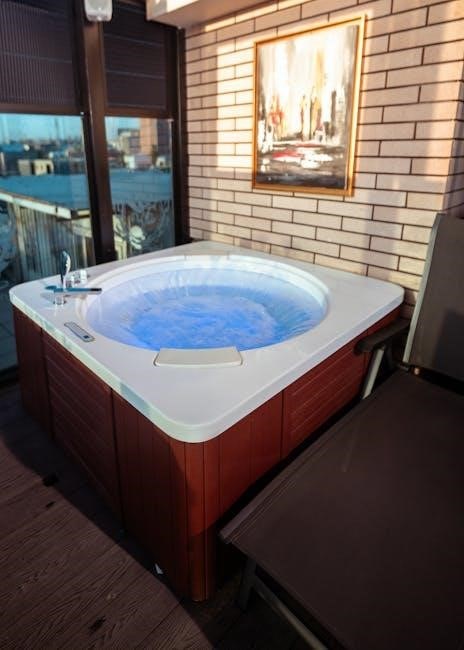
Basic operation involves utilizing the control panel to adjust temperature, activate jets, and control lighting. Familiarize yourself with the button layout and functions. The hot tub is designed for intuitive use, allowing you to customize your soaking experience.
Before entering the hot tub, always verify the water temperature is within a safe and comfortable range. Avoid operating the jets at full power immediately after startup; gradually increase intensity. Regular operation and monitoring will ensure optimal performance and longevity of your Balboa hot tub.
Navigating the Control Panel Interface
The Balboa control panel serves as the central hub for managing your hot tub’s functions. Typically, it features a user-friendly interface with buttons or touchscreen controls. Understanding these controls is key to maximizing your enjoyment.
Common buttons include those for temperature adjustment (up/down arrows), jet control, light selection, and accessing system settings. Some models may have dedicated buttons for filter cycles or programmable features. The display will show current water temperature, set points, and active functions.
To explore the menu, press the “Menu” or “Settings” button (if equipped). This will reveal options for customizing various parameters, such as sleep mode, energy-saving settings, and error code displays. Take time to familiarize yourself with the layout and available options for a personalized experience.
Temperature Adjustment
Maintaining the perfect water temperature is crucial for a comfortable hot tub experience. Balboa control panels offer intuitive temperature adjustment controls, typically utilizing up and down arrow buttons. The display clearly indicates the current water temperature and the set point.
Adjusting the temperature is a straightforward process. Pressing the “up” arrow increases the desired temperature, while the “down” arrow decreases it. The control panel usually allows for adjustments within a specific range, typically between 80°F and 104°F (27°C and 40°C).

Allow sufficient time for the water to reach the newly set temperature. The heating system will activate to achieve the desired warmth. Avoid making drastic temperature changes, as this can strain the system. Consistent, moderate adjustments are recommended for optimal performance and energy efficiency.
Increasing the Water Temperature
To raise the water temperature on your Balboa hot tub, locate the “up” arrow button on the control panel. Pressing this button initiates a request to the heating system to increase the set point. The display will reflect the new, higher temperature setting as you continue to press the button.
Observe the display carefully to monitor the temperature increase. Each press typically adjusts the temperature by one or two degrees Fahrenheit (or Celsius, depending on your panel’s setting). Avoid exceeding the maximum recommended temperature of 104°F (40°C) to prevent scalding and ensure safe operation.

Allow ample time for the water to reach the desired temperature. The heating system will engage, and the water will gradually warm up. The duration depends on the initial water temperature, the ambient air temperature, and the hot tub’s insulation. Patience is key for a comfortable soak!
Decreasing the Water Temperature
Lowering the water temperature in your Balboa hot tub is achieved using the “down” arrow button on the control panel. Pressing this button sends a signal to the system to reduce the set point. The display will immediately show the adjusted, lower temperature.
Monitor the display as you press the button, noting the temperature decrease with each press. Similar to increasing the temperature, each press usually lowers the setting by one or two degrees Fahrenheit (or Celsius). Be mindful not to set the temperature too low, as this could strain the heating system.

Give the system time to respond to the change. The heater will disengage or modulate its output, and the water temperature will gradually decrease. The time required depends on the initial temperature and the surrounding environment. Enjoy a comfortably cooled soak!
Jet Control and Circulation
Balboa hot tubs offer versatile jet control, enhancing your relaxation and therapeutic experience. Typically, jet operation is managed through dedicated buttons on the control panel, often labeled “Jets,” “Bubble,” or with iconographic representations of water movement.
Single-speed jets activate and deactivate the circulation pump, directing water through the jets for a massage effect. Some models feature multiple jet zones, allowing independent control of different jet clusters. This customization lets you target specific muscle groups.
Dual-speed jets provide a low and high setting. The low setting is ideal for gentle, continuous circulation and energy conservation, while the high setting delivers a powerful, invigorating massage. Experiment to find your preferred intensity.
Circulation is vital for maintaining water quality and even temperature distribution. Even when jets aren’t actively engaged, a low-speed circulation pump often runs periodically to prevent stagnation and ensure consistent warmth.
Light Control Options
Balboa hot tubs feature integrated lighting systems designed to enhance the ambiance and create a relaxing atmosphere. Light control is typically accessed via dedicated buttons on the control panel, often marked with a lightbulb icon or labeled “Light.”
Basic models may offer a single on/off function for the underwater light. More advanced systems provide a range of color options, allowing you to customize the mood to your preference. Cycle through available colors by repeatedly pressing the light button.
Some Balboa systems include brightness control, enabling you to adjust the intensity of the light. This feature is particularly useful for creating a subtle glow or a vibrant display.
Certain BP Series models offer programmable light sequences, creating dynamic and visually appealing effects. Explore the control panel settings to discover available light shows and customize them to your liking. Remember to turn off lights when not in use to conserve energy.
Filter Cycle Operation
Maintaining clean water is crucial for a hygienic hot tub experience, and the filter cycle plays a vital role. Balboa hot tubs are equipped with a filter cycle designed to automatically clean the filter, removing debris and ensuring optimal water circulation.
To initiate the filter cycle, locate the “Filter” button on your control panel. Pressing this button activates a short, high-speed pump operation specifically for filter cleaning. The duration of the filter cycle is typically pre-programmed, often lasting around 10-15 minutes.

During the cycle, the pump forces water through the filter cartridge, dislodging trapped particles. It’s recommended to run the filter cycle at least once a week, or more frequently if the hot tub is used heavily.
Regular filter cycles extend the life of your filter cartridge and contribute to clearer, healthier water. Always ensure the filter cartridge is properly installed before operating the cycle. Inspect and clean the filter cartridge regularly as part of your maintenance routine.
Priming the Pump System
Priming the pump is necessary after initial setup, maintenance, or if the hot tub has been drained and refilled. This process removes air from the pump and plumbing lines, ensuring efficient water circulation. Air in the system can cause the pump to run dry and potentially damage it.
To prime the pump, access the priming mode through your Balboa control panel. This is often found within the system setup or service menu. Once activated, the pump will run for a specified period, typically 4-5 minutes, or until manually exited.
During priming, you may hear the pump making unusual noises as it attempts to displace the air. It’s normal for sequences to display information regarding the hot tub’s configuration during this process.
Monitor the pump and listen for a change in sound, indicating that water is flowing through the system. If the pump doesn’t prime after several attempts, consult the troubleshooting section or contact a qualified technician.
Understanding Error Codes
Error codes displayed on your Balboa control panel indicate a problem within the hot tub system. These codes are designed to help diagnose issues quickly and efficiently, preventing potential damage and ensuring safe operation. Ignoring error codes can lead to more significant and costly repairs.
The control panel will typically flash a specific code, often accompanied by a descriptive message. Refer to your Balboa BP Series Installation/Operation Manual for a complete list of error codes and their corresponding meanings. Common issues indicated by error codes include sensor malfunctions, heater failures, or pump problems.
Troubleshooting often involves simple steps like resetting the power or checking connections. However, some error codes require professional attention. Always prioritize safety and disconnect power before attempting any repairs.
Document the error code before contacting customer support, as this information will assist them in providing accurate assistance. A permanent ground connection is crucial for safe operation.
Common Error Codes and Troubleshooting
Error code “LOW FLOW” often indicates insufficient water flow to the heater, potentially due to a clogged filter or closed valve. Check and clean the filter, and ensure all valves are open. “OHS” (Overheat Sensor) suggests the water temperature has exceeded safe limits; power cycle the system and verify sensor functionality.
“ICE” signifies a freezing condition detected by a sensor, requiring immediate attention to prevent pipe damage. Ensure adequate insulation and heating. “S.ERR” typically points to a communication error between the control panel and the system; try resetting the panel.

For priming issues, the system may enter a priming mode lasting 4-5 minutes. Manually exit if the pump(s) prime sooner. Always consult the manual for specific code definitions and troubleshooting steps. Remember to disconnect power before any inspection or repair attempts.
If problems persist, contact a qualified technician for assistance. Documenting the error code and any recent events will aid in diagnosis.
Maintenance Reminders and Alerts
Regular filter cleaning is crucial for optimal performance; aim for every 2-4 weeks, depending on usage; The control panel may display a “FILTER” alert when cleaning is due. Water chemistry balance – pH, alkalinity, and sanitizer levels – should be checked and adjusted weekly to prevent corrosion or scaling.
Shock the water monthly to eliminate combined chlorine and maintain water clarity. Periodically, drain and refill the hot tub (every 3-6 months) to prevent buildup of total dissolved solids. Inspect the shell for any cracks or damage, and address promptly.
The Balboa system may provide alerts for low water levels or potential issues with the heater. Pay attention to these notifications and take appropriate action. Annual professional servicing is recommended for a thorough inspection and maintenance check.
Remember to keep the area around the hot tub clean and free of debris. Proper maintenance extends the life of your spa and ensures a safe, enjoyable experience.
Winterizing Your Balboa Hot Tub
Proper winterization prevents freeze damage to your Balboa hot tub. First, clean the filter thoroughly and remove it. Drain the hot tub completely, including all plumbing lines. Use a wet/dry vacuum to remove any remaining water from the jets and pipes.
Add winterizing chemicals according to the manufacturer’s instructions to protect the plumbing. Disconnect power to the hot tub at the breaker. Insulate exposed plumbing with foam pipe wrap. Consider a hot tub cover lifter to support the cover during heavy snow.

Leave the cabinet open slightly to allow for ventilation. Regularly check the water level in the shell during the winter months, adding more antifreeze if needed. Do not operate the hot tub while winterized. Upon spring startup, follow the initial setup instructions carefully.
Remember to consult your Balboa manual for specific winterizing recommendations for your model.
Safety Precautions
Prioritize safety when enjoying your Balboa hot tub. Never operate the hot tub without a properly installed GFCI (Ground Fault Circuit Interrupter) breaker. Supervise children closely at all times, and never allow unsupervised access. Hot tub water temperatures should not exceed 104°F (40°C).
Individuals with heart disease, diabetes, or other medical conditions should consult a physician before using a hot tub. Avoid using the hot tub while under the influence of alcohol or drugs. Pregnant women should also consult a doctor before use.
Ensure proper ventilation and avoid prolonged exposure. Keep electrical components dry and never attempt to repair them yourself. Regularly inspect the hot tub for any damage or leaks. Use caution when entering and exiting the hot tub, utilizing handrails if available.
Always follow all local regulations and guidelines regarding hot tub safety.
Balboa BP Series Specific Features
The Balboa BP Series control systems offer advanced features for enhanced hot tub enjoyment. Priming mode, lasting 4-5 minutes, ensures efficient pump operation after initial setup or maintenance. The BP Series displays configuration information during startup sequences, indicating normal system checks;
Integrated sensors monitor water temperature and automatically adjust heating cycles. Programmable filtration cycles maintain water clarity and hygiene. Advanced diagnostics provide error codes for quick troubleshooting, assisting in identifying potential issues.
User-friendly interfaces allow for easy temperature control, jet activation, and light customization. BP7 Series models boast even more refined control options and enhanced connectivity. Energy-efficient designs minimize operating costs while maximizing performance. The system supports various jet configurations and lighting options, tailored to your hot tub model.
Refer to your specific model’s documentation for a complete list of features and programming options.
Troubleshooting Common Issues

Error codes displayed on your Balboa control panel are crucial for diagnosing problems. Consult the “Understanding Error Codes” section for specific meanings and solutions. If the pump fails to prime, ensure the filter is clean and the water level is adequate; utilize the priming mode (4-5 minutes) for assistance.
Temperature discrepancies can stem from inaccurate sensor readings or heater malfunctions. Verify the sensor is properly positioned and free from debris. Jet issues often relate to clogged jets or pump obstructions – inspect and clean accordingly.
Light malfunctions may indicate a blown fuse or faulty bulb. Check the electrical panel and replace if necessary. Water clarity problems usually require filter cleaning or chemical adjustments. Always prioritize safety; if you encounter electrical issues, disconnect power immediately and contact a qualified technician.
Regular maintenance prevents many issues. Refer to the “Maintenance Reminders and Alerts” section for guidance.
Warranty Information and Support
Balboa stands behind its products with a comprehensive warranty, details of which are outlined in the separate warranty document included with your hot tub. This warranty typically covers defects in materials and workmanship for a specified period, varying by component. Please retain your proof of purchase for warranty claims.
For technical support, troubleshooting assistance, or to register your hot tub, visit the official Balboa website. You’ll find a wealth of resources, including FAQs, manuals, and contact information for their customer service team. A permanent ground connection is vital for safety, as detailed in the installation manual.
Authorized Balboa dealers also provide support and service. Locate a dealer near you through the Balboa website. Remember to have your hot tub’s model and serial number readily available when contacting support or submitting a warranty claim. Proper installation, following the BP Series Installation/Operation Manual, is crucial for warranty validity;